
Many people think of a ZFS mirror as a configuration with two or perhaps three devices. But a ZFS mirror isn’t limited to that. It is an n-way mirror: every device in the mirror vdev holds a complete copy of the data, and you can put as many devices into it as you like.
Preparation
For this demonstration, plain files are good enough as devices. Eleven files of 256 MB each:
root@testbed:~# mkdir /testdev
root@testbed:~# mkfile 256m /testdev/test0 /testdev/test1 /testdev/test2 /testdev/test3 \
/testdev/test4 /testdev/test5 /testdev/test6 /testdev/test7 /testdev/test8 /testdev/test9 \
/testdev/test10
Two, three … eleven devices
The classic mirror with two devices:
root@testbed:~# zpool create testpool mirror /testdev/test0 /testdev/test1
root@testbed:~# zpool status testpool
  pool: testpool
 state: ONLINE
  scan: none requested
config:

        NAME                STATE     READ WRITE CKSUM
        testpool            ONLINE       0     0     0
          mirror-0          ONLINE       0     0     0
            /testdev/test0  ONLINE       0     0     0
            /testdev/test1  ONLINE       0     0     0

errors: No known data errors
With three devices, the variant you see in many configurations where a two-way mirror is not considered safe enough:
root@testbed:~# zpool destroy testpool
root@testbed:~# zpool create testpool mirror /testdev/test0 /testdev/test1 /testdev/test2
root@testbed:~# zpool status testpool
  pool: testpool
 state: ONLINE
  scan: none requested
config:

        NAME                STATE     READ WRITE CKSUM
        testpool            ONLINE       0     0     0
          mirror-0          ONLINE       0     0     0
            /testdev/test0  ONLINE       0     0     0
            /testdev/test1  ONLINE       0     0     0
            /testdev/test2  ONLINE       0     0     0

errors: No known data errors
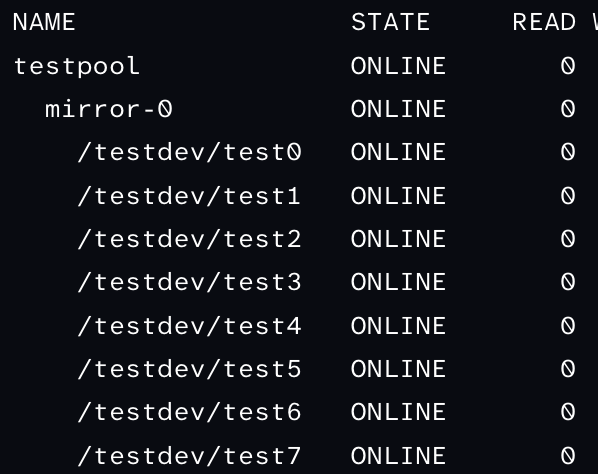
But nothing stops you from creating an eleven-way mirror:
root@testbed:~# zpool destroy testpool
root@testbed:~# zpool create testpool mirror \
/testdev/test0 /testdev/test1 /testdev/test2 /testdev/test3 \
/testdev/test4 /testdev/test5 /testdev/test6 /testdev/test7 \
/testdev/test8 /testdev/test9 /testdev/test10
root@testbed:~# zpool status testpool
  pool: testpool
 state: ONLINE
  scan: none requested
config:

        NAME                 STATE     READ WRITE CKSUM
        testpool             ONLINE       0     0     0
          mirror-0           ONLINE       0     0     0
            /testdev/test0   ONLINE       0     0     0
            /testdev/test1   ONLINE       0     0     0
            /testdev/test2   ONLINE       0     0     0
            /testdev/test3   ONLINE       0     0     0
            /testdev/test4   ONLINE       0     0     0
            /testdev/test5   ONLINE       0     0     0
            /testdev/test6   ONLINE       0     0     0
            /testdev/test7   ONLINE       0     0     0
            /testdev/test8   ONLINE       0     0     0
            /testdev/test9   ONLINE       0     0     0
            /testdev/test10  ONLINE       0     0     0

errors: No known data errors
The pool still has the capacity of a single device. Every write goes to all eleven devices, and the pool survives as long as one of them is intact.
Now let’s put some data into the pool and note its checksum:
root@testbed:~# dd if=/dev/urandom of=/testpool/testfile bs=1024k count=100
100+0 records in
100+0 records out
root@testbed:~# digest -a sha256 /testpool/testfile
<checksum>
Why would you want that?
For the belt-and-suspenders crowd, more than three copies may be useful on their own. The more interesting use case, however, is something else: you can create identical copies of your pool on several devices and then detach them as independent pools. Just think of devices located in a SAN or on an iSCSI server that can be presented to other systems afterwards.
This is what zpool split is for. It splits devices off a mirrored pool and turns them into a new pool with the same content:
root@testbed:~# zpool split testpool testpool_10 /testdev/test10
root@testbed:~# zpool split testpool testpool_9 /testdev/test9
root@testbed:~# zpool split testpool testpool_8 /testdev/test8
root@testbed:~# zpool split testpool testpool_7 /testdev/test7
root@testbed:~# zpool split testpool testpool_6 /testdev/test6
root@testbed:~# zpool split testpool testpool_5 /testdev/test5
root@testbed:~# zpool split testpool testpool_4 /testdev/test4
root@testbed:~# zpool split testpool testpool_3 /testdev/test3
root@testbed:~# zpool split testpool testpool_2 /testdev/test2
root@testbed:~# zpool split testpool testpool_1 /testdev/test1
Each call splits off one device. Afterwards, testpool is left with /testdev/test0 alone, and the ten new pools are not imported yet.
Importing a split-off copy
Now you can take any of these devices and import it as a separate pool. Since the devices are files here, zpool import needs to know where to look for them:
root@testbed:~# zpool import -d /testdev testpool_1
root@testbed:~# zpool status testpool_1
  pool: testpool_1
 state: ONLINE
  scan: none requested
config:

        NAME              STATE     READ WRITE CKSUM
        testpool_1        ONLINE       0     0     0
          /testdev/test1  ONLINE       0     0     0

errors: No known data errors
Let’s check the content:
root@testbed:~# digest -a sha256 /testpool_1/testfile
<checksum>
Same checksum, same data. The split-off pool is a complete and consistent copy of the pool at the moment of the split, and from now on it is independent of the original. You could import it on a different system, use it as the starting point for a test environment, or take it off-site.
A word of caution: a split-off mirror is a point-in-time copy, not a backup strategy. It doesn’t replace snapshots and zfs send, which are much more practical for regular copies.
Cleaning up
root@testbed:~# zpool destroy testpool_1
root@testbed:~# zpool destroy testpool
root@testbed:~# rm -r /testdev
The other split-off pools were never imported, so deleting their files is enough.